Skip to content
  • Categories
  • Tags
  • Popular
  • Users
  • Groups
Skins
  • Light
  • Brite
  • Cerulean
  • Cosmo
  • Flatly
  • Journal
  • Litera
  • Lumen
  • Lux
  • Materia
  • Minty
  • Morph
  • Pulse
  • Sandstone
  • Simplex
  • Sketchy
  • Spacelab
  • United
  • Yeti
  • Zephyr
  • Dark
  • Cyborg
  • Darkly
  • Quartz
  • Slate
  • Solar
  • Superhero
  • Vapor

  • Default (Flatly)
  • No Skin
Collapse

Odoo 中文社区

  1. Home
  2. Categories
  3. Python 开发
  4. odoo11页面颜色更改

odoo11页面颜色更改

Scheduled Pinned Locked Moved Python 开发
28 Posts 6 Posters 29.2k Views 3 Watching
  • Oldest to Newest
  • Newest to Oldest
  • Most Votes
Reply
  • Reply as topic
Log in to reply
This topic has been deleted. Only users with topic management privileges can see it.
  • C Offline
    C Offline
    cooper
    wrote on last edited by
    #1

    odoo11能够更改页面颜色么?求解答,谢谢!!

    H 1 Reply Last reply
    0
    • C cooper

      odoo11能够更改页面颜色么?求解答,谢谢!!

      H Offline
      H Offline
      hui
      wrote on last edited by
      #2

      @cooper
      是说的页面的背景颜色还是数据的背景颜色,还是什么,能具体点吗,或者截图说明

      C 1 Reply Last reply
      0
      • C Offline
        C Offline
        cooper
        wrote on last edited by
        #3
        This post is deleted!
        H 1 Reply Last reply
        0
        • H hui

          @cooper
          是说的页面的背景颜色还是数据的背景颜色,还是什么,能具体点吗,或者截图说明

          C Offline
          C Offline
          cooper
          wrote on last edited by
          #4

          @hui 是指画面的背景颜色和数据list行的颜色。

          H 1 Reply Last reply
          0
          • C cooper

            This post is deleted!

            H Offline
            H Offline
            hui
            wrote on last edited by
            #5

            @cooper
            如下,list行的颜色的改变可以使用 decoration-info这类属性。效果如图:

            <tree decoration-info="state=='progress'" decoration-danger="state=='confirmed'"> <!-- Or RED for late stuff-->
                            <field name="name"/>
                            <!--<field name="user_id"/>-->
                            <field name="effective_date"/>
                            <field name="priority"/>
                            <field name="state"/>
                            <field name="active" invisible="1"/>
                        </tree>

            

            0_1530522684054_color.png

            1 Reply Last reply
            0
            • C cooper

              @hui 是指画面的背景颜色和数据list行的颜色。

              H Offline
              H Offline
              hui
              wrote on last edited by
              #6

              @cooper 画面的背景颜色不知道你说的是哪个画面的,不过应该可以通过写css达到你的要求的。

              C 1 Reply Last reply
              0
              • H hui

                @cooper 画面的背景颜色不知道你说的是哪个画面的,不过应该可以通过写css达到你的要求的。

                C Offline
                C Offline
                cooper
                wrote on last edited by
                #7

                @hui 非常感谢,关于画面的颜色问题,您能随便举一个代码的例子么?
                因为是新手,代码不太熟悉。谢谢。

                H 1 Reply Last reply
                0
                • C cooper

                  @hui 非常感谢,关于画面的颜色问题,您能随便举一个代码的例子么?
                  因为是新手,代码不太熟悉。谢谢。

                  H Offline
                  H Offline
                  hui
                  wrote on last edited by
                  #8

                  @cooper
                  给form视图添加背景颜色,效果如下图。(因为sheet的背景是一张图片所以看不出有背景颜色)
                  步骤:
                  1、在模块下创建目录static/src/css/re_style.css(css名称随意),代码如下:

                  .o_form_view{
                      background-color: yellow;
                  }
                  

                  2、在views视图中创建assets.xml,

                  <?xml version="1.0" encoding="utf-8"?>
                  <odoo>
                      <data>
                          <template id="assets_backend" name="form widget" inherit_id="web.assets_backend">
                              <xpath expr="." position="inside">
                                  <link rel="stylesheet" href="/sps_project/static/src/css/re_style.css"/>
                                                 
                              </xpath>
                          </template>
                      </data>
                  </odoo>
                  

                  3 、更新模块就行了。
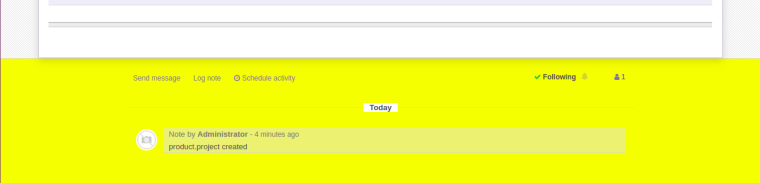
                  0_1530523535126_form color.png

                  C 1 Reply Last reply
                  0
                  • H hui

                    @cooper
                    给form视图添加背景颜色,效果如下图。(因为sheet的背景是一张图片所以看不出有背景颜色)
                    步骤:
                    1、在模块下创建目录static/src/css/re_style.css(css名称随意),代码如下:

                    .o_form_view{
                        background-color: yellow;
                    }
                    

                    2、在views视图中创建assets.xml,

                    <?xml version="1.0" encoding="utf-8"?>
                    <odoo>
                        <data>
                            <template id="assets_backend" name="form widget" inherit_id="web.assets_backend">
                                <xpath expr="." position="inside">
                                    <link rel="stylesheet" href="/sps_project/static/src/css/re_style.css"/>
                                                   
                                </xpath>
                            </template>
                        </data>
                    </odoo>
                    

                    3 、更新模块就行了。

                    0_1530523535126_form color.png

                    C Offline
                    C Offline
                    cooper
                    wrote on last edited by
                    #9

                    @hui 太感谢了,帮了我大忙了。👍

                    H 1 Reply Last reply
                    0
                    • C cooper

                      @hui 太感谢了,帮了我大忙了。👍

                      H Offline
                      H Offline
                      hui
                      wrote on last edited by
                      #10

                      @cooper 不客气,正好你问的我会。

                      C 1 Reply Last reply
                      0
                      • H hui

                        @cooper 不客气,正好你问的我会。

                        C Offline
                        C Offline
                        cooper
                        wrote on last edited by
                        #11
                        This post is deleted!
                        1 Reply Last reply
                        0
                        • D Offline
                          D Offline
                          digitalsatori
                          管理员
                          wrote on last edited by
                          #12

                          @cooper 可以看看 demo.openerp.cn, 社区版11.0,不一样的主题😄

                          【上海先安科技】(tony AT openerp.cn)

                          C I 3 Replies Last reply
                          0
                          • D digitalsatori

                            @cooper 可以看看 demo.openerp.cn, 社区版11.0,不一样的主题😄

                            C Offline
                            C Offline
                            cooper
                            wrote on last edited by
                            #13
                            This post is deleted!
                            D 1 Reply Last reply
                            0
                            • 静 Offline
                              静 Offline
                              静静
                              wrote on last edited by
                              #14

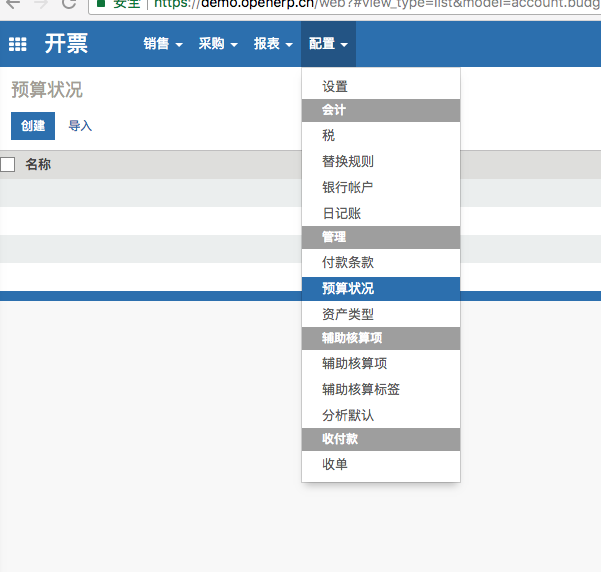
                              0_1530691399247_3D42DAB4-FAE8-4FCC-8620-6130F880266E.png 三级菜单背景色不是太好吧。鼠标悬停也是灰色。

                              D 1 Reply Last reply
                              0
                              • 静 静静

                                0_1530691399247_3D42DAB4-FAE8-4FCC-8620-6130F880266E.png 三级菜单背景色不是太好吧。鼠标悬停也是灰色。

                                D Offline
                                D Offline
                                digitalsatori
                                管理员
                                wrote on last edited by
                                #15

                                @静静 嗯,是不太好看。

                                【上海先安科技】(tony AT openerp.cn)

                                1 Reply Last reply
                                0
                                • C cooper

                                  This post is deleted!

                                  D Offline
                                  D Offline
                                  digitalsatori
                                  管理员
                                  wrote on last edited by
                                  #16

                                  @cooper

                                  可以创建模块来更改。可以参照这个改:https://apps.odoo.com/apps/themes/10.0/backend_theme_v10/

                                  【上海先安科技】(tony AT openerp.cn)

                                  1 Reply Last reply
                                  0
                                  • D digitalsatori

                                    @cooper 可以看看 demo.openerp.cn, 社区版11.0,不一样的主题😄

                                    C Offline
                                    C Offline
                                    cooper
                                    wrote on last edited by
                                    #17

                                    @digitalsatori 好的,谢谢☺

                                    1 Reply Last reply
                                    0
                                    • A Offline
                                      A Offline
                                      ap1689
                                      wrote on last edited by
                                      #18

                                      @cooper 请教可以社区版的浅灰色为主的页面颜色改成类似Office2007那种以浅绿色为主的吗?谢谢!Style Theme Office2007.isl

                                      H 1 Reply Last reply
                                      0
                                      • A ap1689

                                        @cooper 请教可以社区版的浅灰色为主的页面颜色改成类似Office2007那种以浅绿色为主的吗?谢谢!Style Theme Office2007.isl

                                        H Offline
                                        H Offline
                                        hui
                                        wrote on last edited by
                                        #19

                                        @ap1689 我觉得可以。社区版浅灰色的页面颜色是一张背景图片,你可以通过css修改的。你可以试试。

                                        C 1 Reply Last reply
                                        0
                                        • H hui

                                          @ap1689 我觉得可以。社区版浅灰色的页面颜色是一张背景图片,你可以通过css修改的。你可以试试。

                                          C Offline
                                          C Offline
                                          cooper
                                          wrote on last edited by
                                          #20

                                          @hui 好的,谢谢。

                                          1 Reply Last reply
                                          0

                                          Hello! It looks like you're interested in this conversation, but you don't have an account yet.

                                          Getting fed up of having to scroll through the same posts each visit? When you register for an account, you'll always come back to exactly where you were before, and choose to be notified of new replies (either via email, or push notification). You'll also be able to save bookmarks and upvote posts to show your appreciation to other community members.

                                          With your input, this post could be even better 💗

                                          Register Login
                                          Reply
                                          • Reply as topic
                                          Log in to reply
                                          • Oldest to Newest
                                          • Newest to Oldest
                                          • Most Votes


                                          • Login

                                          • Don't have an account? Register

                                          • Login or register to search.
                                          • First post
                                            Last post
                                          0
                                          • Categories
                                          • Tags
                                          • Popular
                                          • Users
                                          • Groups